

Amazon A+ Content for Authors: What to Put Below Your Book Description Without Creating Clutter
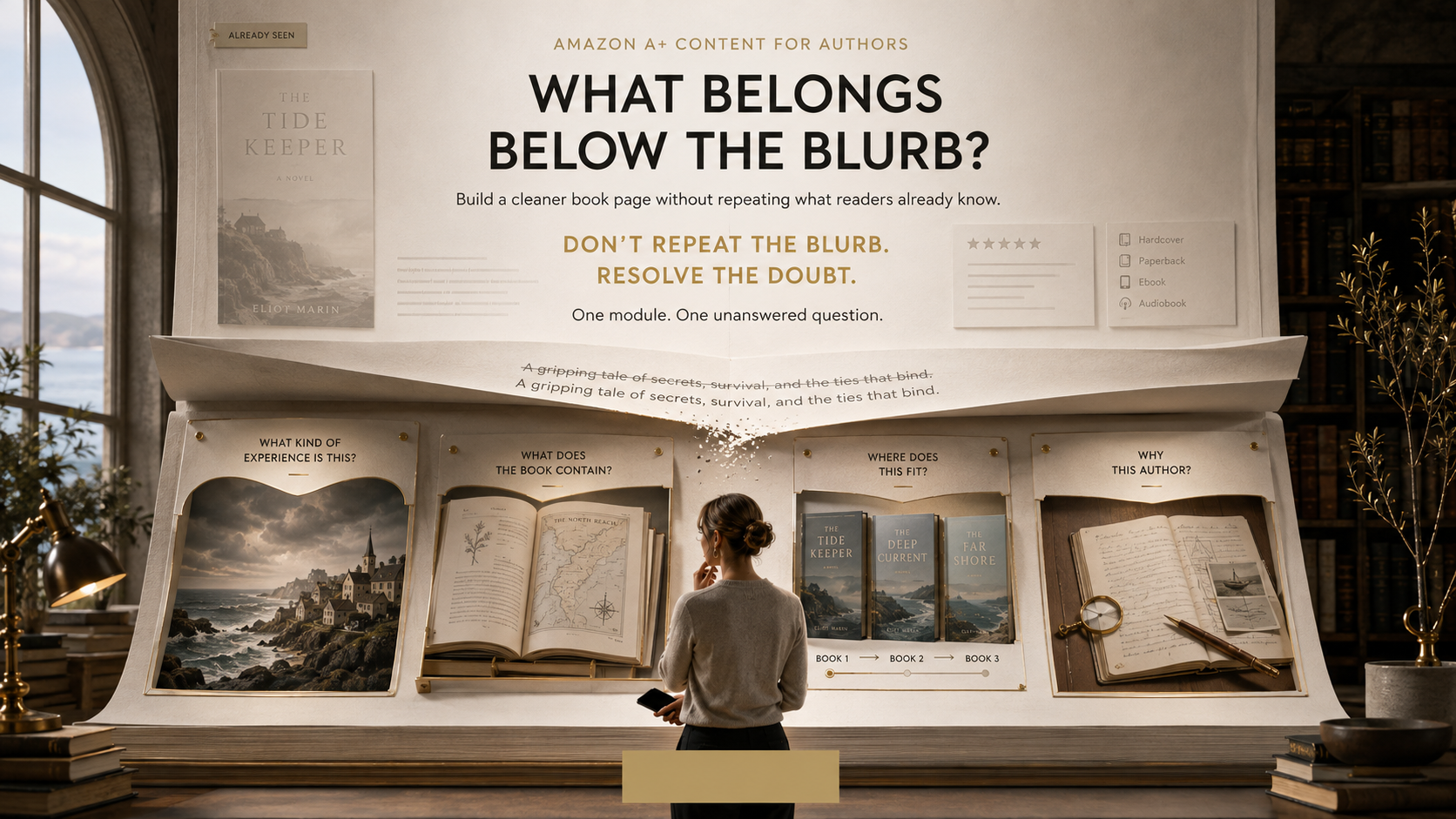
A reader who scrolls deep into your Amazon book page does not need the blurb again.
They already saw it.
What they may still be wondering is whether the book is really for them. What does the inside look like? Is this part of a series? What kind of reading experience should they expect? Does the author know this subject? Is there enough here to make the book worth choosing over the five other tabs they have open?
That is where Amazon A+ Content for authors can earn its space.
Not by making the page longer.
By answering the questions that are still open.
Amazon and Kantar's April 2026 U.S. book path-to-purchase study found that 59% of surveyed book buyers were open-minded about which title they would buy, 36% were swayed toward a different title from the ones they had originally searched for, and 41% said browsing prompted their purchase. This was not a study of A+ Content performance, so it would be wrong to claim A+ caused those decisions. What it does show is that a shopper's decision can still move while they are browsing.
Your lower product page should help that decision.
Not bury it.
Key Takeaways
Treat A+ Content as the next layer of the sales page, not a prettier version of the description.
Give every module one job and one reader question to answer.
Amazon currently offers 17 module types, but a layout can use only up to five. You do not need all five.
Series authors, fiction writers, nonfiction authors, memoirists, and children's-book creators should use the space differently depending on what readers still need at that point on the page.
Amazon restricts reviews, pricing, discounts, external links, QR codes, competitor comparisons, contact information, and time-sensitive language. Check the policy before submitting.
What Job Should A+ Content Actually Do?
Good A+ Content should resolve information the cover and description leave unfinished. It can show readers the book's visual world, interior value, series relationship, relevant author background, or other details that are easier to understand through structured images and short copy than through another paragraph of sales text.
Amazon describes A+ Content as a way to add images, text, and comparison tables to a book's detail page. It appears in the From the Publisher area, and Amazon makes one particularly useful observation:
“most readers will need to scroll to view the content.”
That single sentence should shape your entire strategy.
Someone who reaches A+ Content has already moved past the first impression.
So stop introducing the book from zero.
The description might say:
A disgraced detective returns to the town where his sister disappeared twenty years earlier.
The A+ section does not need:
A disgraced detective returns home to uncover the truth about his missing sister...
Again.
Instead, it might show:
the isolated coastal setting
the three central characters
the series order
a short visual signal of the book's psychological tone
Same story.
New information.
Use the One-Question Rule
Forget clever acronyms for a moment.
Use one rule:
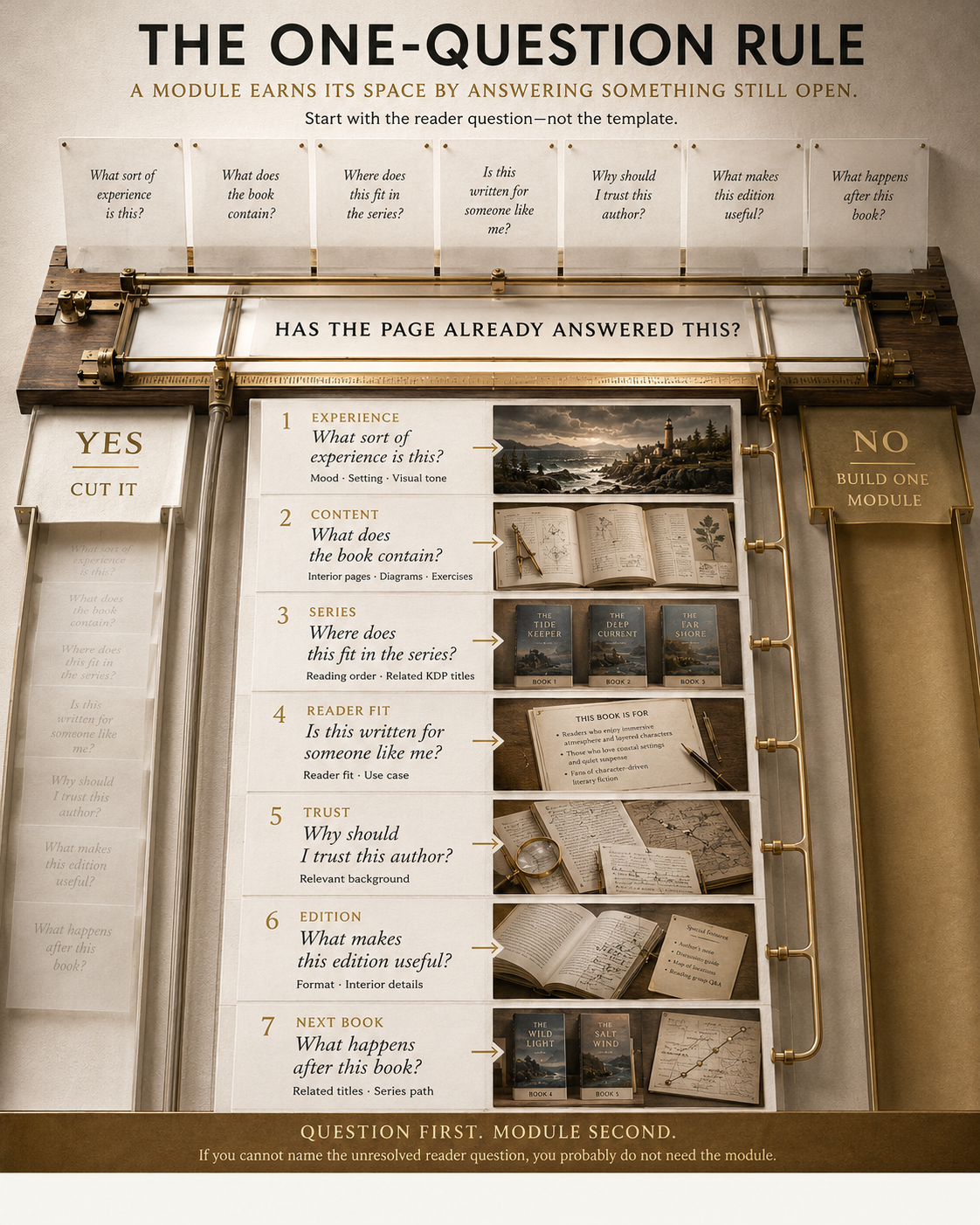
Every A+ module should answer one reader question the page has not answered well enough yet.
Before designing anything, write the question at the top of the draft.
For example:
What does the inside of this workbook actually look like?
Then build one module around interior pages.
Or:
Is this Book One, or will I be lost if I start here?
Build a series module.
Or:
Why should I trust this author on this subject?
Use a short author-background block.
If you cannot write the reader question, you probably do not need the module.
That one habit prevents most A+ clutter.
Five Available Slots Are Not a Dare
Amazon currently offers 17 module choices and allows up to five modules per detail-page layout. Its own examples organize possible uses around series information, author background, cover art, and book samples.
“Up to five” matters.
A novelist may need three.
A workbook may need four.
A standalone memoir might need only two.
More content is useful only when more uncertainty exists.
A useful module earns the scroll
| The reader is thinking... | A+ Content can show... |
|---|---|
| “What sort of experience is this?” | Mood, setting, themes, visual tone |
| “What does the book contain?” | Interior pages, diagrams, illustrations, exercises |
| “Where does this fit in the series?” | Reading order or related KDP titles |
| “Is this written for someone like me?” | Clear reader fit or use case |
| “Why does this author know the subject?” | Relevant author background |
| “What makes this edition useful?” | Format-specific or interior information |
| “What happens after this book?” | Related books from the author's own KDP catalog |
The mistake is treating those as seven sections you must create.
Pick the unresolved questions that matter for this book.
What Should Fiction Authors Put Below the Description?
Fiction usually does not need more synopsis.
It needs desire, orientation, and atmosphere.
Show the world without explaining the plot
Fantasy might use:
A Location
A Map Fragment
An Important Artifact
A Faction
Three Character Portraits
A Visual Representation Of The Book's Tone
Romance might emphasize:
Relationship Dynamics
Setting
Emotional Tone
Genuine Tropes Readers Care About
Connected Titles
Thrillers might use:
Setting
tension
central conflict
character roles
a series path
Keep spoilers out.
A+ Content should create another reason to open the book, not replace the experience of reading it.
Use tropes carefully
“Enemies to lovers.”
“Found family.”
“Locked-room mystery.”
“Unreliable narrator.”
These can help the right reader recognize a fit.
But do not turn a module into:
TROPES! TROPES! TROPES!
If twelve fashionable phrases are required to describe the novel, the positioning probably needs work.
Choose only the signals that genuinely shape the reading experience.
Series authors have a particularly useful option
Amazon's Comparison Chart module currently allows up to five ASINs and Amazon explicitly recommends series information as one possible use. The titles must come from your KDP account.
Instead of showing five covers and nothing else, make the comparison useful.
For example:
| Book | Story position | Main focus |
|---|---|---|
| Book One | Start here | The kingdom falls |
| Book Two | Read second | The rebellion begins |
| Book Three | Read third | The final siege |
Now the chart answers a real question.
What Should Nonfiction Authors Put in A+ Content?
Nonfiction readers often have a different hesitation:
Will this book give me something I can actually use?
A+ Content can make an abstract promise tangible.
Show the thinking inside the book
If the manuscript contains:
Frameworks
Diagrams
Worksheets
Exercises
Tables
Checklists
Recipes
Prompts
Step-By-Step Methods
Visual Explanations
show selected examples.
A shopper understands “includes practical exercises” faster when they can actually see an exercise.
Clarify who the book is for
Compare these:
A powerful guide for everyone who wants to become a better leader.
versus:
Written for new managers responsible for a team for the first time.
The second gives the reader something to decide.
That is what A+ Content should do.
Give credentials context, not ceremony
If an author's experience matters to the subject, explain why.
Not:
Award-winning thought leader and visionary expert.
Instead:
Based on fifteen years managing distributed engineering teams across three companies.
Assuming, of course, that the statement is factual and verifiable.
Relevance builds confidence better than a wall of self-praise.
What About Memoir?
Memoir sits somewhere between fiction and nonfiction.
The author matters.
So does emotional tone.
A good memoir layout might include:
A visual sense of place
Archival images, landscape, a meaningful object, or period imagery can give context when rights permit.
A short “why this story” element
Not another biography.
One brief piece of context explaining the perspective behind the memoir may be more useful.
Selected interior material
If the book contains photographs, letters, documents, timelines, or other visual elements, showing a carefully chosen sample can communicate the physical experience of the book.
The important word is carefully.
A family scrapbook dumped into five modules will still look like a family scrapbook dumped into five modules.
What Should Children's Book Authors Show?
For a picture book, the cover cannot prove what the next thirty pages look like.
A+ Content can help.
Show interior art
Parents, gift buyers, teachers, and other adults may want to see whether the illustration quality continues past the cover.
Show a few representative spreads or cropped interior moments.
Introduce the character
One strong character panel can work well when that character carries the story or series.
Keep the copy short.
Clarify the reading experience
You might communicate:
Story Theme
Format
Series Relationship
Visual Style
Appropriate Reading Context
Avoid making unsupported educational or developmental claims.
If your children's book presentation needs stronger visual consistency from cover to interior and marketing material, Montlake Publishers' book illustration services and book cover design services are the more natural supporting services to review.
What Should You Leave Out?
A+ Content has more rules than many authors realize.
Current Amazon KDP A+ Content Guidelines prohibit or restrict several tempting additions.
Do not add customer reviews
Amazon does not permit customer reviews inside A+ Content.
Publication endorsements are different. Amazon currently allows up to four properly attributed quotes or endorsements from well-known publications or public figures.
Do not add prices or discount language
Avoid:
“Only $4.99”
“50% off”
“Affordable”
“Free bonus”
“Buy now”
“Get yours today”
Amazon specifically restricts pricing, discounts, promotional wording, and purchase-directing language.
Do not send readers somewhere else
Do not insert:
Author Website Links
Email Addresses
Phone Numbers
Qr Codes
Newsletter Signup Links
Off-Amazon Calls To Action
Amazon prohibits web links intended to redirect shoppers, QR codes, and personal contact information in A+ Content.
Do not compare yourself with competitors
You can compare related books from your own KDP account in the appropriate chart.
You cannot build:
My Book vs Other Authors
or:
Better than [Competitor Book]
Amazon expressly prohibits competitor comparisons.
Be careful with time-sensitive wording
Amazon's current rules also restrict language such as “new,” “latest,” “on sale now,” and similar time-sensitive claims.
That matters because A+ Content may remain live long after your launch campaign has ended.
Do Not Turn Alt Text Into an SEO Trick
Every A+ image needs to work for a real reader, including readers using screen readers.
Amazon warns that image alt text which fails to describe the image usefully can cause rejection.
Bad:
best fantasy romance book romantasy dragon book fantasy series Amazon Kindle novel
Better:
Silver crown beneath a crescent moon with red roses around the base.
Alt text is accessibility text.
Treat it that way.
Natural description already gives search and machine systems the context they need. Stuffing phrases into it only makes the experience worse.
The Most Important 2026 Change: Amazon Can Generate A+ Content With AI
This deserves more attention than most older A+ guides give it.
Amazon currently offers generative AI inside certain modules marked “AI Ready.” The feature is available for English-language A+ Content in the United States. Authors can provide an ASIN and optional prompts, and Amazon can generate text and images for the module.
That sounds convenient.
It also comes with an important warning from Amazon: generated material can contain information that was not present in the author's input, and the author remains responsible for what gets published.)
So if you use it, review:
Character Descriptions
Setting Details
Author Claims
Visual Consistency
Book Promises
Spelling
Factual Statements
Prohibited Promotional Language
Image Accuracy
The AI can fill a box.
It cannot decide whether that box deserves to exist.
That decision is still yours.
A Practical Example: The A+ Page That Got Longer but Not Better
Imagine a standalone psychological thriller.
The product description already tells us:
A woman returns to her childhood town after her brother disappears. A twenty-year-old secret begins to surface. Someone in town knows why she came back.
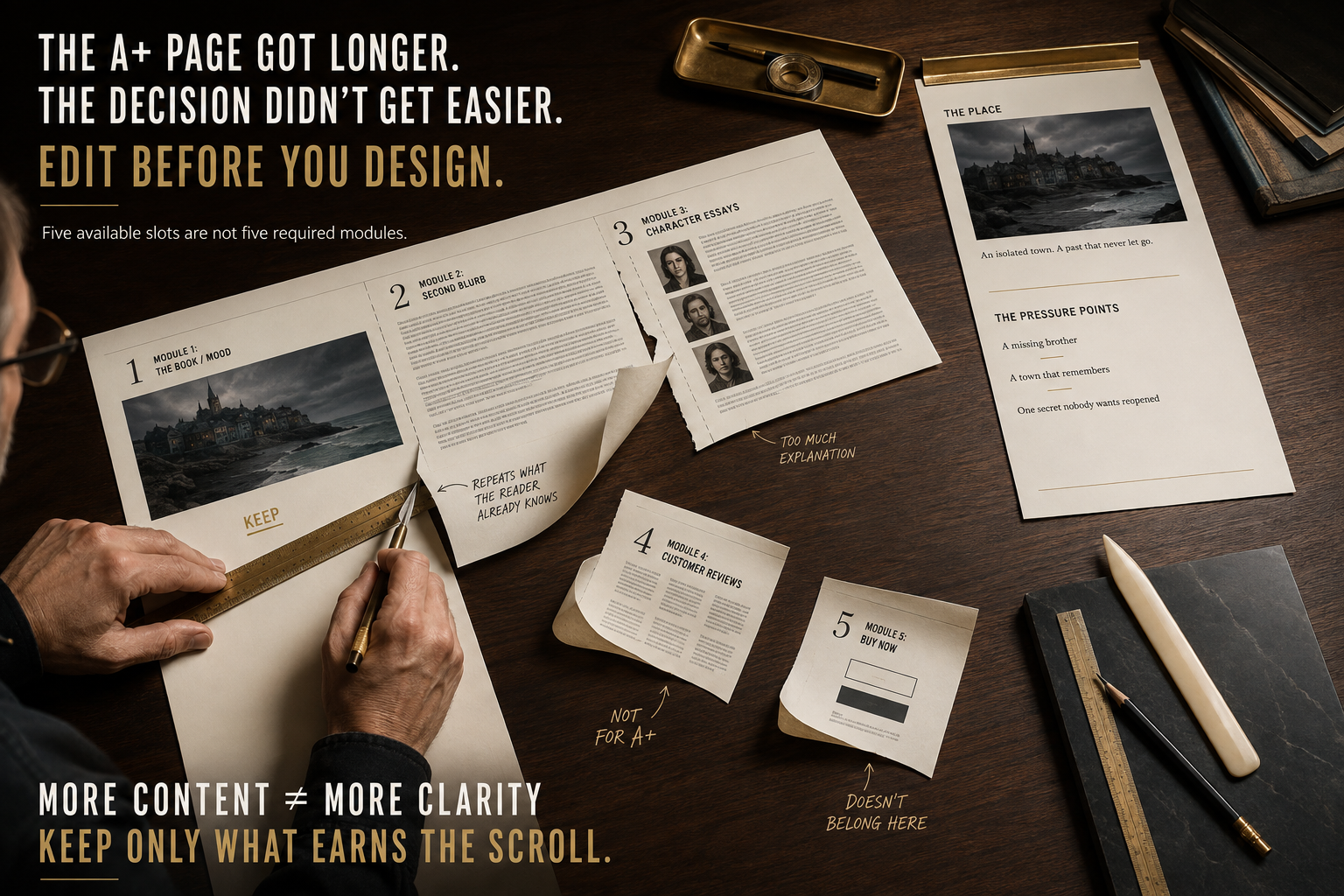
Then the A+ layout says:
Module 1
Large book cover plus:
She thought she escaped the past. She was wrong.
Fine.
Module 2
A 250-word summary retelling the description.
Now we are repeating ourselves.
Module 3
Three character images with six paragraphs explaining their backstories.
Too much.
Module 4
Five customer-review quotes.
Amazon does not allow those.
Module 5
“Buy now before the truth disappears.”
Also a problem under Amazon's guidelines.
The fix is not prettier graphics.
The fix is editing.
A stronger version might be:
Module 1: The place
One unsettling image of the coastal town.
One line.
Module 2: The pressure points
Three short elements:
A missing brotherA town that remembersOne secret nobody wants reopened
Module 3: The author or series
If this is part of a series, show the reading path.
If it is standalone and author background adds nothing to the decision, stop at two modules.
That is a cleaner sales page.
Not a smaller effort.
A better decision.
How to Plan A+ Content Before Opening A+ Content Manager
Do not start by browsing seventeen templates.
Start with the reader.
1. Read the page from top to bottom
Look at:
Cover
Title
Subtitle
Description
Formats
Reviews
Existing Images
Series Information
Write down what the shopper already knows.
2. List what they may still need
Limit yourself to three to five questions.
If you produce twelve, rank them.
3. Match one module to one question
Not the other way around.
You are choosing a layout because the information needs that layout.
4. Cut repeated copy
If a sentence could be pasted back into the description without changing anything, ask whether it belongs in A+.
5. Test the phone experience
Amazon allows desktop and mobile previews before submission. Use both.
Small text inside graphics is one of the fastest ways to make expensive artwork feel cheap.
6. Run a policy check before submitting
Amazon says compliant content normally appears on the detail page within eight business days, although reviews may take longer during high-volume periods.
Do not submit the night before launch and assume everything will be live tomorrow.
Which Modules Are Usually Most Useful for Books?
Amazon has seventeen choices, but authors can usually narrow the field quickly.
| Module | Strong use | Weak use |
|---|---|---|
| Image + text overlay | Mood, setting, central concept | Repeating the cover |
| Three images + text | Characters, benefits, interior samples | Three miniature blurbs |
| Multiple image module | Illustration or visual examples | Decorative filler |
| Comparison chart | Series order, related KDP titles | Competitor comparison |
| Single image + sidebar | Short author context | Full autobiography |
| Product description text | Extra explanation when genuinely needed | A second 6,000-character blurb |
Amazon's Standard Product Description Text module can hold up to 6,000 characters.
That does not mean you should use 6,000 characters.
A parking lot can hold fifty cars.
You do not need to buy fifty cars.
Where A+ Content Fits in Your Book Marketing
A+ Content is a product-page layer.
It is not the whole marketing strategy.
If readers are not reaching the Amazon page, A+ Content cannot create traffic by itself.
If your book cover signals the wrong genre, fix that first.
If your positioning is unclear, fix it.
If the launch and discovery strategy needs work, Montlake Publishers' book marketing services are the more relevant place to begin. Montlake's current marketing service focuses on audience research, genre, competitive context, positioning, outreach, campaigns, and book visibility.
If the title is still being prepared for publication, book publishing support may be the earlier step.
And if you are not yet sure which part of the project needs attention, you can start from the Montlake Publishers homepage.
One important boundary: Amazon controls KDP's A+ Content policies and approval decisions. No publishing-support company can guarantee that Amazon will approve a submission.
Final Thoughts
The smartest A+ Content usually begins with deletion. Delete the second blurb. Delete the paragraph that says your book is unforgettable. Delete the giant image of the cover people have already seen. Delete any module that exists only because Amazon gave you another slot.
Then look at what remains unanswered. That is where good Amazon A+ Content for authors begins. Show the interior when seeing it helps. Clarify the series when order matters. Introduce the author when background affects trust. Show the visual world when images say something prose cannot. And use the One-Question Rule:
One module. One unanswered reader question. One reason to keep it.
A reader who has scrolled this far has already given your book attention. Do not reward that attention with more noise.
Give them clarity.

Frequently Asked Questions
What is Amazon A+ Content for authors?
Amazon A+ Content lets KDP authors add structured text, images, and comparison modules to eligible book detail pages. It appears in the From the Publisher area and can support series information, author background, cover art, book samples, and other material that helps readers understand the title.
How many A+ Content modules can an author use?
Amazon currently offers 17 module options and allows up to five modules in one A+ detail-page layout. Five is the maximum, not a recommendation. A shorter layout can be stronger when two or three modules answer the important reader questions without repeating information already visible higher on the page.
Does A+ Content replace the normal book description?
No. A+ Content supplements the normal product-page information. The description should still explain the core book promise, while A+ Content can show visual material, series context, interior pages, relevant author information, or other details that work better in structured modules.
Can authors put reviews in Amazon A+ Content?
Customer reviews are not allowed in A+ Content. Amazon currently permits up to four endorsements from well-known publications or public figures when they meet the attribution requirements. Authors should check the current A+ Content Guidelines before placing any quotation in a module.
Can A+ Content link to an author's website or newsletter?
No. Amazon's current guidelines prohibit web links or language that redirects shoppers elsewhere, along with QR codes and personal contact information such as phone numbers and email addresses. Keep newsletter signup and author-site promotion on channels where those links are permitted.
Can I show other books from my series?
Yes. Amazon specifically suggests using A+ Content for series information. Its Comparison Chart module currently supports up to five ASINs, and comparison charts may only compare books from your own KDP account rather than competing authors or publishers.
How long does Amazon take to approve A+ Content?
Amazon states that compliant A+ Content normally appears within eight business days after submission. Review can take longer during high-volume periods, so authors preparing for a release should submit early enough to allow for rejection, correction, and resubmission if necessary.
Can Amazon generate A+ Content with AI?
Yes, for eligible AI Ready modules. Amazon currently offers its generative A+ feature for English content in the United States. Authors can provide an ASIN and optional prompts, but Amazon warns that generated material may introduce information not found in the source input, so every result needs human review.
Does Amazon A+ Content guarantee more book sales?
No. Amazon does not guarantee sales from A+ Content, and there is no responsible basis for promising a specific conversion lift for every book. A+ Content can provide additional information during the buying decision, but results still depend on the book, audience, positioning, cover, description, traffic, price, reviews, and wider marketing.
Can Montlake Publishers help with the wider Amazon book-marketing strategy?
Montlake Publishers offers book marketing services covering areas such as audience research, competitive positioning, outreach, campaigns, and book visibility. Its public page does not currently state that A+ Content production is a specific included deliverable, so authors should confirm the exact project scope before commissioning that work.


